One link.
Real conversations.
Create your Rynzal, share your link and receive anonymous questions. You decide what gets answered.
Create your profile


Install Rynzal Progressive Web App (PWA) on your Mobile
Keep Rynzal on your home screen, or keep using it in your browser.
iOS / iPhone
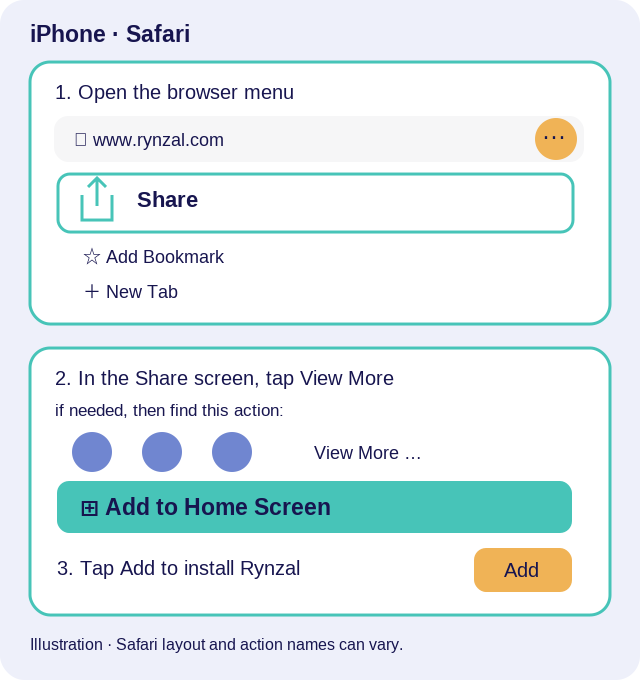
In Safari, tap the three dots (…) to open the browser menu, then tap Share (the square with an up arrow). If Share is already visible, tap it directly. In the Share screen, tap View More if shown, or scroll through the actions, then tap Add to Home Screen. Keep Open as Web App on if shown and tap Add. That installs Rynzal on your iPhone.
Android
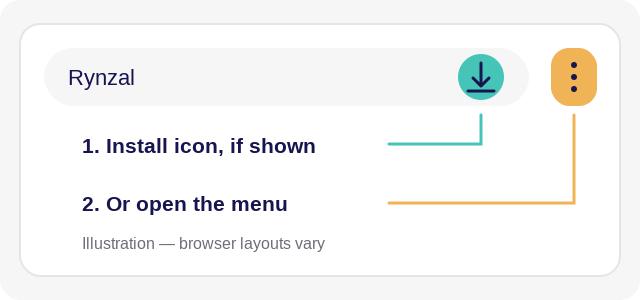
Tap the down-arrow install icon in the browser address bar, then tap Install. If the icon is not shown, open the browser menu and look for Install app, Install and create shortcut, or Add to Home screen. Follow the browser's instructions.
The web app currently needs an internet connection.